Use case
Ad creative for a store that ships physical things
A store’s creative problem is a supply problem. New products, new angles, new placements, and ads that stop working long before a shoot can replace them. In Lollipop an ad is made by describing it in a chat, with a canvas you can open to change any scene, actor or clip, so a second version of one costs a sentence rather than another day of filming.
What is actually scarce when you sell physical products?
Not ideas. Footage. Every product you list needs its own, and the cost of getting it does not fall as the catalogue grows: a creator charges per video, and a studio day covers one product on one set in one aspect ratio. So the number of ads a store can test each month is set by its production capacity rather than by how many things it has to sell.
Lollipop ships 21 ad formats.
The 21 formats fall into six families: UGC, podcast and interview, animation, faceless, footage-driven, and SaaS product demos. A store will live mostly in three of them.
Picking a format in Lollipop is not filling in a template: each of the 21 formats ships its own scripting agent, its own scene agent and its own visual rules, and generation is bound by them. Which is why the choice matters more than the brief does.
Put your own product through one of these.
Make a product adEvery new account starts with 4,000 credits.
Does it come out in the shape each placement wants?
Ads render vertical (9:16), square (1:1) and widescreen (16:9).
Each format carries its own default length and its own allowed lengths, from 15 seconds up to 90. A store usually wants the short end of that for paid social and the long end for a landing page, and those are two different formats rather than two exports of the same one.
Captions come in 10 animated presets, from bold word-by-word swaps to karaoke highlighting and the plain native look each platform already uses.
And a finished ad exports as an editable timeline for DaVinci Resolve, Final Cut Pro and Premiere Pro, plus a media handoff for CapCut. So the version your editor cuts by hand for the Black Friday push starts from the generated one instead of from nothing.
How much of the brief do you have to write?
Give Lollipop your website and it researches the brand, meaning voice, product and positioning, before it writes anything. For a store that is usually enough to start, because the product page already carries the copy somebody agonised over.
There is a second door in. Point Lollipop at an existing video ad and it will analyse it and rebuild the same structure for your product, which is the honest way to answer a competitor creative that is beating yours.
Which format for which job?
Each format carries a one-line description of what it is, written into its own definition, and that line is the customer-facing summary of the format. Five of them cover most of what an online store needs.
| Format | What you bring | What it is for | What it will not do |
|---|---|---|---|
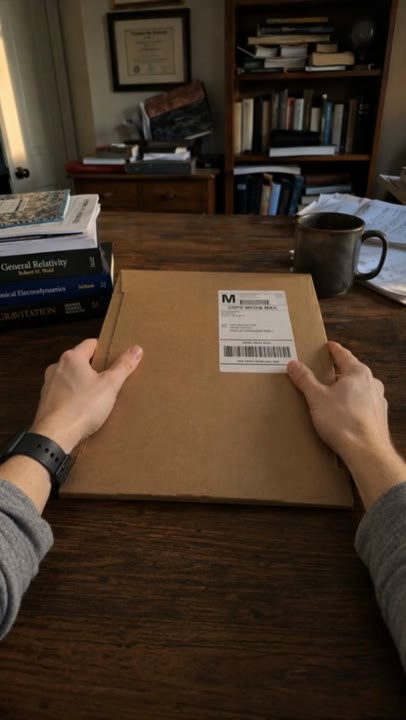
| POV Unboxing | A sealed package worth opening | Proving the thing is real, from the buyer point of view | Show a face, or say a word |
| Product Mashup | A range where the variants are the story | Running the whole line-up past one locked camera | Change two things at the same cut |
| Story Slideshow | Moments of the product actually in use | A quick caption-led run through a day | Argue anything a caption cannot hold |
| Yapper | A claim a person can be believed about | One trusted face telling it the way a friend would | Cut away to the product, ever |
| Street Interview | Something strangers will have an opinion on | Stacking several of those opinions on one pavement | Let anyone but the host address the lens |
Two of those are worth reading properly before you brief them, because their rules are stricter than they look. POV Unboxing is silent and hands-only, and one pair of hands is the only part of any person that ever appears. Product Mashup locks one camera template and swaps exactly one thing at each cut, which is what makes a range read as a range instead of as five unrelated clips. If the product is better watched than described, Story Slideshow runs product-in-use footage in plot order with no presenter and no voiceover.
What does a month of this cost?
Lollipop has two self-serve plans: Pro at $99/month and Scale at $249/month.
Plans include 110,000 and 300,000 credits a month.
That works out to roughly 11 and 30 finished ads a month.
1,000 credits is $1.
That peg is what makes the credit figures above legible as money rather than as points. Agencies and larger teams can get custom volume and invoiced billing.
Where the credits go is worth knowing, because it changes which formats are cheap for you. An actor who speaks runs the whole actor pipeline: a generated portrait, a preview video, a cloned voice and a video-model element. An actor who is only seen stops at the portrait. A silent hands-and-product ad is a different sort of spend from a cast of talking heads.
What this does not solve
- It does not photograph your product. A generated shot is built from what you gave it, so packaging copy, small logos and the exact finish of a surface are where a careful buyer looks first. Formats built on footage you supply avoid the problem altogether, and that is a real reason to prefer them for a hero SKU.
- A format will refuse things you want. Each definition states when to use it and when to avoid it, written as a pair, and the avoid half is as specific as the use half. Asking a silent format for a price callout is not a settings problem.
- Volume is bounded by the plan, and the arithmetic is rough. That works out to roughly 11 and 30 finished ads a month. Treat that as an order of magnitude rather than an allowance: what an ad costs depends on its length, how many shots it has and how many people speak in it, and those vary more than the plan does. A store testing dozens of creatives a week should price custom volume rather than reason from that number.
- It stops at the file. Nothing here buys media, builds a landing page, touches your product feed or tells you which of the ads worked. Those are still your job and your other tools.
Which formats do stores reach for after the first one?
Two more in the catalogue are built for a physical product specifically, and neither one needs a performer who can talk. A product mashup runs short clips locked to one template, and exactly one thing changes at each cut: either the product or the scene, never both. That is the format for a catalogue with variants. UGC Text and Music is a silent montage where nothing is spoken anywhere and on-screen captions carry every word. That is the one for feeds watched with the sound off.
Start a product ad for your store.
Make a product adDescribe the product in a chat. Lollipop writes the script, casts the actor and renders every shot, and you can open the canvas to change any of it.